What is Argo Float? A Complete Guide to Ocean Observation Data
If you are new to oceanography, one of the first terms you will encounter is Argo float. Argo floats are autonomous instruments that drift through the ocean, dive below the surface, and return measurements that help scientists understand how the ocean changes over time.
They matter because ocean conditions are not static. Temperature, salinity, oxygen, and other properties vary with depth, season, and location. To understand the real structure of the ocean, you need more than a surface map. You need vertical profiles collected repeatedly across the globe. That is exactly what Argo provides.
This guide explains what an Argo float is, how it works, what kind of data it produces, why Argo data is so important, and how to start exploring real Argo profiles without writing Python code.
What Is an Argo Float?
An Argo float is an autonomous profiling float used for ocean observation. It is part of the International Argo Program, a global effort to collect consistent, repeat observations of the upper and middle ocean.
Each float spends most of its time below the sea surface. It drifts with ocean currents, dives to a target depth, then rises back toward the surface while measuring the water column. After surfacing, it sends its observations through satellite communication before beginning the next cycle.
In simple terms:
- A float is the instrument
- A profile is one vertical set of measurements
- A cycle is one repeat of drifting, diving, profiling, and transmitting
Argo transformed ocean observation because it made subsurface measurements more routine, global, and comparable. Before Argo, many measurements depended on ship campaigns, which were valuable but limited in time and space.
Why Argo Floats Matter
Argo floats fill a major observational gap between two older approaches:
- Satellites give broad coverage, but they mainly observe the ocean surface
- Ships can measure the water column directly, but only along limited routes and schedules
Argo floats provide a third kind of observing system: repeated subsurface measurements across wide areas of the ocean. That makes them useful for:
- Tracking changes in temperature and salinity
- Understanding seasonal and regional ocean structure
- Studying water masses and mixing
- Monitoring ocean heat content
- Supporting climate research and model validation
For students and early-career researchers, Argo is often the easiest entry point into large-scale ocean observation data because the measurements are physically meaningful and organized as profiles.
How Does an Argo Float Work?
A typical Argo float follows a repeating cycle:
- It starts near the surface after transmitting data.
- It sinks to a parking depth, often around 1,000 meters.
- It drifts with currents for several days.
- It then sinks deeper, often to around 2,000 meters.
- It rises toward the surface while recording measurements through the water column.
- Once at the surface, it sends the profile and position data by satellite.
- The cycle repeats.
This repeated behavior is why Argo data is so powerful. A single float does not just observe one place once. It creates a time series of vertical ocean profiles along a drifting path.
What Does an Argo Float Measure?
The core Argo system is best known for measuring:
- Pressure
- Temperature
- Salinity
In practice, salinity is derived from conductivity, temperature, and pressure measurements. These variables are enough to describe a large part of the ocean’s physical structure.
Some Argo floats carry additional sensors, especially in biogeochemical programs. Depending on the float, you may also encounter:
- Dissolved oxygen
- Chlorophyll-related optical measurements
- Nitrate
- pH
- Particle backscatter
- Light-related variables such as irradiance
This is why Argo data is useful across different levels of oceanography. A beginner may start with temperature and salinity profiles, while a more advanced user may move into oxygen, productivity, or water-mass analysis.
What Does Argo Data Look Like?
Argo data is usually organized around floats and cycles.
Some of the most common concepts are:
| Term | Meaning |
|---|---|
| WMO ID | The identifier for a specific float |
| Cycle number | The sequence number for one profile event |
| Profile | A vertical set of observations from one ascent |
| Trajectory | The float positions through time |
| Pressure levels | The sampled points through the water column |
If you open an Argo data file, you will usually see arrays of values for pressure, temperature, salinity, time, location, quality flags, and metadata. That structure is powerful, but it can also be intimidating if you are new to NetCDF files or oceanographic naming conventions.
For many users, the first practical views of Argo data are not the raw files themselves but visual products such as:
- Temperature vs depth
- Salinity vs depth
- Oxygen vs depth
- Float trajectory maps
- Temperature-salinity or theta-salinity diagrams
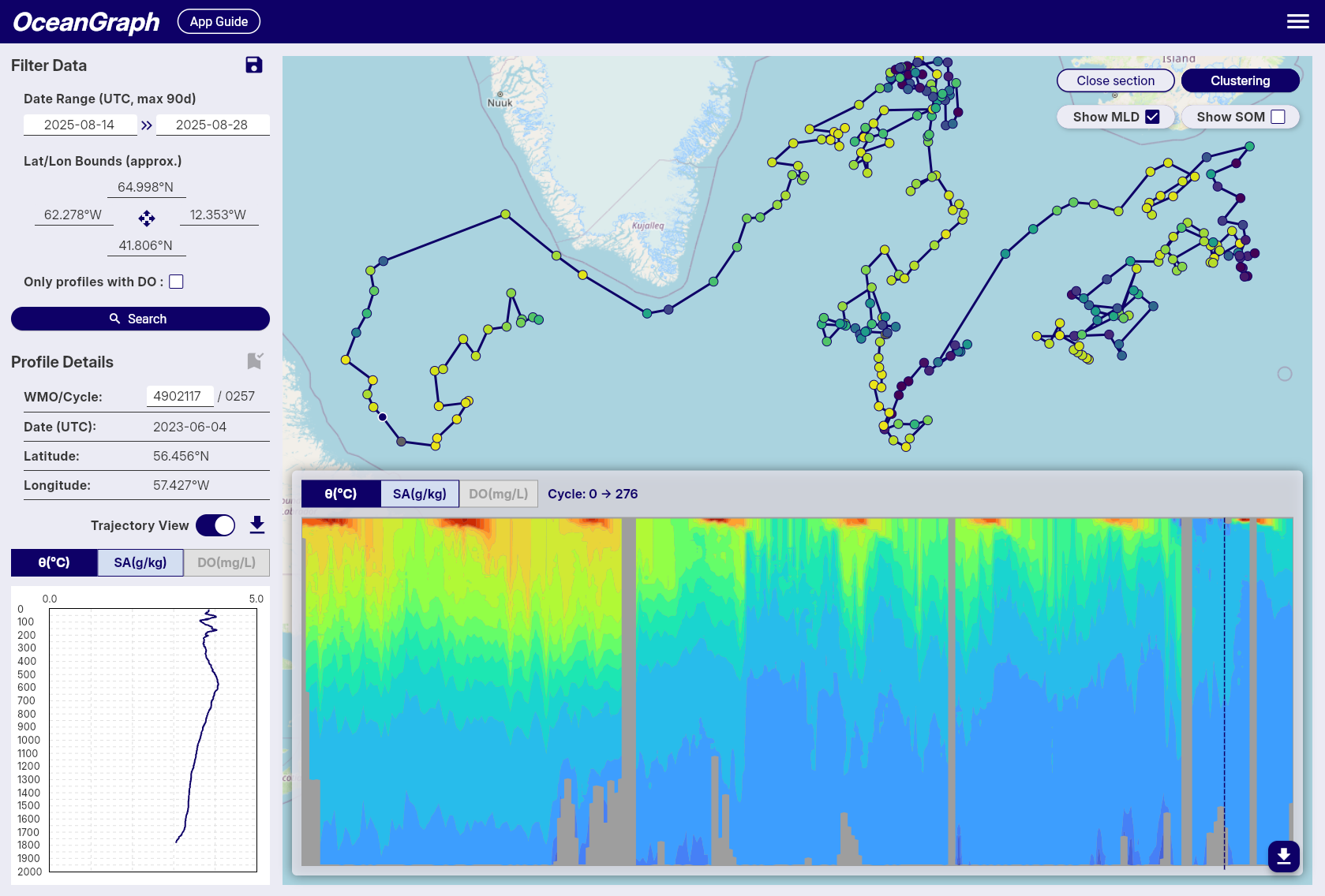
Those visualizations are often the fastest way to build intuition before moving into full Argo float data analysis.
Core Argo, BGC Argo, and Deep Argo
You may also hear about several related Argo categories:
- Core Argo focuses mainly on physical variables such as temperature and salinity
- BGC Argo adds biogeochemical sensors such as oxygen, nitrate, pH, or optical variables
- Deep Argo extends observations deeper than the standard core profiling range
You do not need to master all of these on day one. The important first step is understanding that Argo is not just one data product. It is a broader observing system with related profile types and use cases.
How Beginners Should Read Argo Profiles
If you are just starting, the best approach is to read Argo data in layers.
1. Start with place and time
Before looking at any profile, check:
- Where was the float?
- When was the profile taken?
- Is it one profile or part of a sequence?
This gives you geographic and seasonal context.
2. Look at one variable against depth
A temperature profile can show you:
- Surface warming
- Mixed layers
- Sharp gradients
- Deep stability
A salinity profile can show you:
- Fresh surface layers
- Salty subsurface water
- Vertical structure associated with different water masses
3. Compare multiple cycles
One profile is useful. A sequence of profiles is much better. Comparing nearby cycles helps you see how the upper ocean changes in time and whether a feature is persistent or temporary.
4. Use a T-S diagram to understand water masses
A depth profile shows vertical structure. A T-S diagram shows how temperature and salinity relate to each other. Both views matter. If you want to understand water-mass structure, mixing, or the identity of different layers, a T-S view becomes especially useful.
OceanGraph includes a dedicated guide for θ-S Diagram, which is a good next step after learning the basics.
Why Argo Data Often Feels Hard at First
Argo is conceptually simple, but working with the data can still feel harder than expected.
Common reasons include:
- Raw files are often distributed in NetCDF format
- Variable names and metadata are not always beginner-friendly
- Quality control flags need to be interpreted correctly
- One float can have many cycles, files, and derived products
- Plotting useful figures often requires code before you fully understand the data
This creates a common frustration loop:
- You want to understand Argo data
- You download files
- You spend most of your time handling format and plotting
- You still have not built intuition about the ocean structure itself
That is exactly why visual exploration matters.
A Better First Step: Explore Before You Code
Before writing scripts, it helps to answer simpler questions first:
- What does a real Argo profile look like?
- How does one float change over time?
- What does a water mass pattern look like in profile space?
- Which profiles are worth deeper analysis later?
OceanGraph is designed for that stage of work. Instead of starting with file parsing, you can start with interpretation.
With OceanGraph, you can:
- Search Argo profiles by region, time, and WMO ID
- Inspect trajectories and time-series sections
- Explore vertical profiles interactively
- View θ-S diagrams to understand water-mass structure
Useful starting points:
Try Real Argo Data in OceanGraph
If your goal is not just to learn the definition of an Argo float but to actually see ocean observation data, OceanGraph is the next step.
Try with real Argo data -> OceanGraph
Explore profiles interactively
OceanGraph helps bridge the gap between reading about Argo and doing something useful with Argo float data. You can build intuition first, then move to deeper analysis once you know which profiles, regions, or patterns matter.
Frequently Asked Questions
Is an Argo float the same as a buoy?
No. A surface buoy usually stays near the surface or at a fixed location. An Argo float is designed to move vertically through the water column and drift between cycles.
Does every Argo float measure the same variables?
No. Core Argo floats mainly provide physical measurements such as temperature and salinity. Other programs add sensors for oxygen, nitrate, pH, optics, and related variables.
What is the difference between a float and a profile?
A float is the instrument. A profile is one set of vertical measurements collected during a single ascent.
Do I need Python to start using Argo data?
Not necessarily. Python becomes useful for custom analysis, but it is not the best first step for everyone. Many beginners learn faster by exploring trajectories, profiles, and T-S structure visually first.
Conclusion
Argo floats are one of the most important tools in modern oceanography because they make subsurface ocean observation data available at global scale and repeated over time. If you want to understand ocean structure, water masses, seasonal variability, or profile-based analysis, Argo is a foundational dataset.
The fastest way to begin is not to memorize file formats. It is to look at real profiles, connect them to place and time, and build intuition from the data itself. That is where OceanGraph can help.