Argo NetCDF Format Explained for Beginners
If you have downloaded Argo data and opened your first .nc file, the experience is often confusing. You expected ocean profiles. Instead, you got a long list of variables, dimensions, metadata fields, and quality-control flags.
That is why so many beginners search for an explanation of the Argo NetCDF format. The challenge is usually not whether the data exists. It is understanding how the file is organized and which parts matter first.
This guide explains what NetCDF is, how Argo profile files are typically structured, which variables you should inspect first, what beginners often misunderstand, and how to use OceanGraph to understand the data before building a full coding workflow.
If you want a profile-centered overview before the file-format details, start with How to Read Argo Float Data for Beginners (What to Look at First).
What Is NetCDF?
NetCDF stands for Network Common Data Form. It is a file format widely used for scientific data, especially when the data includes multiple variables, metadata, and dimensions such as time, depth, latitude, and longitude.
NetCDF is common in oceanography because it can store:
- Measurement arrays
- Coordinates
- Units
- Metadata
- Quality information
- Multiple dimensions in one file
That makes it powerful, but not always beginner-friendly.
When you open a NetCDF file, you do not see a narrative explanation of the observation. You see a data structure. Your first task is to translate that structure into a scientific question.
Why Argo Uses NetCDF
Argo data is more than a single column of temperature values.
A profile can include:
- Float identity
- Cycle information
- Position
- Time
- Pressure levels
- Temperature and salinity
- Quality flags
- Additional variables such as oxygen in some cases
NetCDF is useful because it keeps those components together in a consistent machine-readable format.
The downside is that the file is optimized for storage and exchange, not for beginner interpretation.
How to Think About an Argo File
The best way to understand an Argo NetCDF file is not to memorize every variable name. It is to think in layers.
At a high level, one Argo profile file usually combines:
- Observation context
- Measurement arrays
- Quality and status information
- Metadata about the platform or processing
If you read the file in that order, it becomes easier.
1. Observation Context: What Profile Am I Looking At?
Before worrying about the measurement arrays, identify the observation itself.
The first questions are:
- Which float produced this profile?
- Which cycle is it?
- When was it taken?
- Where was it reported?
Common fields you will often encounter include:
PLATFORM_NUMBERfor the float identityCYCLE_NUMBERfor the profile sequenceJULDfor time informationLATITUDELONGITUDE
The exact combination can vary depending on file type and processing level, but the goal stays the same: place the profile in time and space before interpreting the measurements.
This is important because Argo data is easiest to understand as an observation event, not as a list of variable names.
2. Measurement Arrays: What Was Observed Through the Water Column?
Once you know the profile context, move to the measurement arrays.
In many core Argo profile files, the most important variables are:
PRESTEMPPSAL
These usually represent:
- Pressure
- Temperature
- Practical salinity
Some files also include adjusted versions such as:
PRES_ADJUSTEDTEMP_ADJUSTEDPSAL_ADJUSTED
The practical beginner takeaway is simple:
- Start by identifying the main profile variables
- Check whether adjusted versions are present
- Do not try to interpret every variable at once
If you are using biogeochemical Argo data, you may also encounter variables such as dissolved oxygen or other sensor products. But for first-pass understanding, pressure, temperature, and salinity are usually enough.
3. Quality Information: Can I Trust Every Value Equally?
One reason Argo NetCDF files feel complicated is that they do not store measurements alone. They also store quality information.
You may see fields such as:
PRES_QCTEMP_QCPSAL_QCPOSITION_QC
The exact interpretation depends on the Argo conventions for the file, but the general point is consistent: not every value should be treated identically without checking its quality status.
For beginners, a useful rule is:
- Do not panic when you see QC fields
- Remember that quality information is part of responsible interpretation
- Focus first on recognizing the overall profile structure
A questionable point or missing value does not automatically make the whole profile unusable.
4. Dimensions: Why Do the Arrays Have Different Shapes?
Another common point of confusion is the array structure.
Argo NetCDF files often organize values using dimensions such as:
- Number of profiles
- Number of vertical levels
- Number of parameters
That means some variables look like one-dimensional arrays, while others are stored across more than one dimension.
Beginners often get stuck here because they expect the file to behave like a simple spreadsheet. But the data is hierarchical:
- A float can have profiles
- A profile can have many depth or pressure levels
- Each level can have several measured variables
You do not need to master the full dimensional design immediately. What matters first is understanding which array corresponds to the water-column observations you want to inspect.
The First Variables to Check
If you open an Argo NetCDF file and want the fastest path to understanding, inspect the data in this order:
- Float identity
- Cycle number
- Time
- Latitude and longitude
- Pressure
- Temperature
- Salinity
- Quality-control fields
This order matches the scientific workflow better than opening the file alphabetically.
It answers:
- What is this observation?
- Where and when did it happen?
- What does the water column look like?
- Are there any quality issues I need to keep in mind?
Raw vs Adjusted Variables
One detail that often confuses beginners is the presence of both raw-looking variables and adjusted variables.
You may see a pair such as:
TEMPTEMP_ADJUSTED
or
PSALPSAL_ADJUSTED
The exact use depends on the data product and processing context, but the practical point is that Argo files may contain both measurement values and versions that reflect later calibration or correction workflows.
For a beginner, the safest approach is:
- Notice whether adjusted variables exist
- Check the file documentation or workflow you are following
- Avoid mixing variables casually without knowing why
You do not need to become an expert in processing conventions on day one. You do need to recognize that the distinction exists.
Common Beginner Mistakes
Most problems come from reading the file in the wrong order.
Starting with file structure instead of observation context
If you begin with obscure variables and dimensions, the file feels abstract. Start with float, cycle, time, and location.
Treating one profile as the whole float
An Argo float produces many cycles. A single profile is one observation in a sequence, not the whole story.
Ignoring quality fields completely
You do not need to decode everything immediately, but quality information is part of proper data use.
Assuming pressure is just a cosmetic coordinate
Pressure is the core vertical coordinate in the profile and determines how you read the water-column structure.
Trying to understand everything before visualizing anything
This is one of the biggest workflow mistakes. A profile often becomes clearer once you see it plotted.
Example: A Better Way to Read an Argo NetCDF File
Suppose you open a profile file and see dozens of variable names.
A better beginner workflow is:
- Identify the float and cycle.
- Check the date and location.
- Find the pressure, temperature, and salinity arrays.
- Confirm whether adjusted versions are present.
- Look at quality fields only after you understand the basic profile structure.
- Plot or inspect the profile visually.
This sequence turns a confusing NetCDF file into a readable ocean observation.
The Traditional Workflow: Python First
Many people approach Argo NetCDF files by opening them directly in Python with a scientific library and then building plots from scratch.
That is a valid workflow, but beginners often hit several friction points:
- NetCDF feels unfamiliar
- Variable names are not self-explanatory at first
- Quality fields interrupt the first reading
- You may debug indexing before you understand the water column
- Comparing several files still takes setup
If your first goal is understanding rather than automation, this can be heavier than necessary.
A Better First Step: Understand the Observation Before the File
OceanGraph is useful because it lets you approach Argo data from the observation side first.
Instead of beginning with file parsing, you can:
- Search real profiles by region, time, and WMO ID
- Inspect the profile context directly
- Open vertical profiles immediately
- Compare several observations before deciding what to code later
Useful follow-up pages are:
- Search and Bookmark
- Vertical Profiles
- Visualizing Argo Float Data Without Python (Step-by-Step Guide)
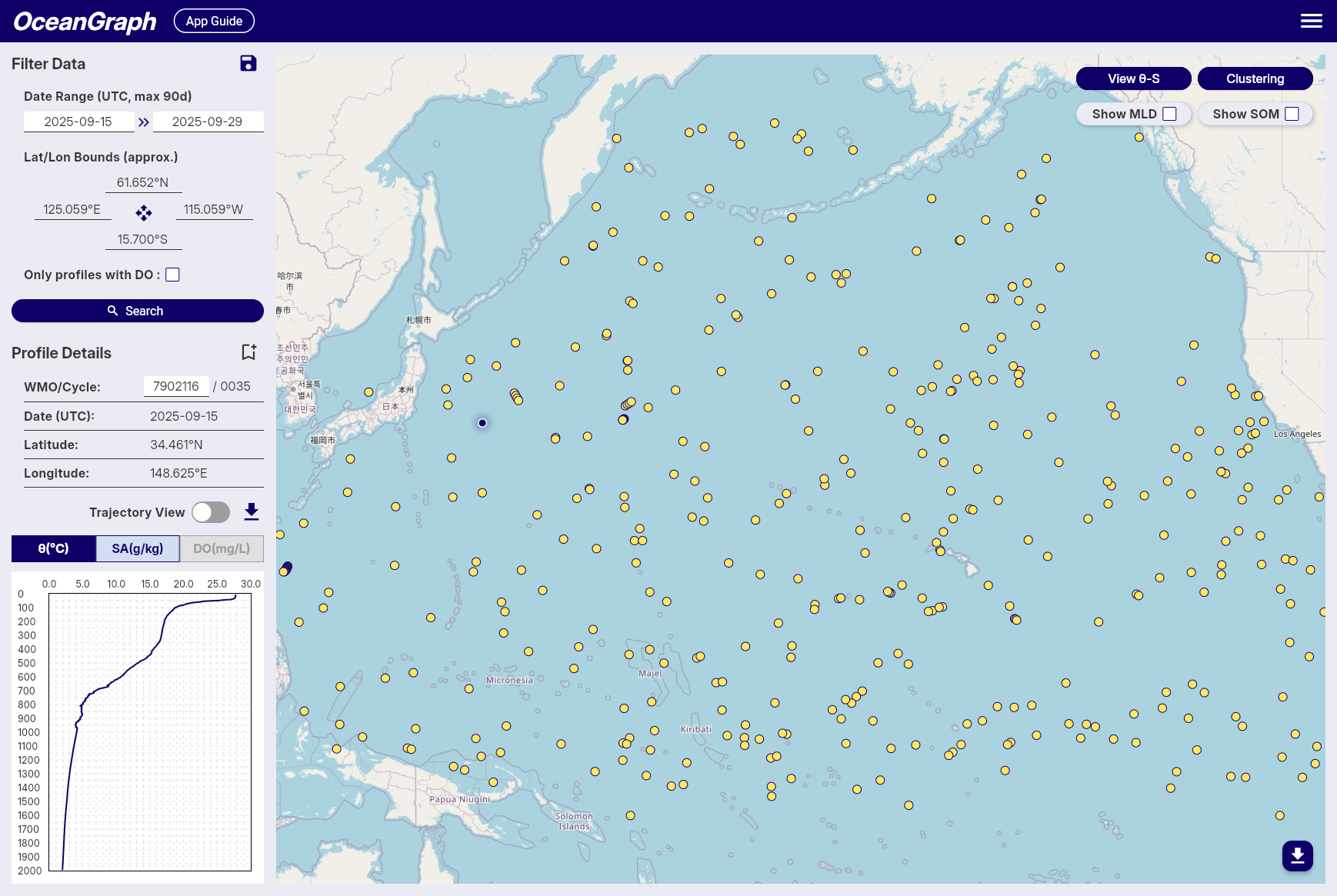
Once you already know which float, cycle, or pattern matters, the NetCDF file becomes much easier to approach.
Explore Argo Data Before You Parse the File
If you want to reduce file-format friction and understand what the data actually represents first, OceanGraph is a practical place to start.
Try with real Argo data -> OceanGraph
Explore profiles interactively
OceanGraph helps bridge the gap between opening an Argo NetCDF file and understanding the ocean profile inside it.
Frequently Asked Questions
What does NetCDF mean in Argo data?
It refers to the scientific file format used to store Argo variables, coordinates, metadata, and quality information in a structured way.
What variables should I look at first in an Argo NetCDF file?
Start with float identity, cycle number, time, location, pressure, temperature, salinity, and then the relevant QC fields.
Why are there so many QC variables?
Because Argo data includes quality-control information alongside the measurements. That helps users interpret the data responsibly.
What is the difference between TEMP and TEMP_ADJUSTED?
In many Argo files, adjusted variables represent values associated with later correction or calibration workflows. The details depend on the data product, so it is important not to mix them casually.
Do I need Python to start understanding Argo NetCDF files?
No. Python is useful for deeper analysis, but many beginners understand the data faster if they first inspect the observation visually and then return to the file structure.
Conclusion
The Argo NetCDF format feels difficult at first because it presents you with a data structure before it presents you with an observation. Once you read the file in a scientific order, the logic becomes much clearer: identify the profile, place it in time and space, inspect the main variables, then interpret quality and processing details.
For many beginners, the fastest path is to look at real profiles first and approach the file only after the observation makes sense. That is where OceanGraph can help.