T-S Diagrams in Oceanography Explained (With Examples)
If you are learning oceanography, a T-S diagram is one of the most useful plots you can understand early. It shows how temperature and salinity relate to each other within seawater, making it easier to identify water masses, mixing, and density structure than by looking at temperature or salinity alone.
For beginners, the challenge is that a T-S diagram often looks abstract at first. A vertical profile is intuitive because depth is visible on the axis. A T-S diagram removes depth from the main view and instead shows the relationship between two properties. That shift is exactly why it is powerful, but it is also why many people ask: how do you actually read a T-S diagram?
This guide explains what a T-S diagram is, how to interpret its axes and shapes, what common patterns mean, and how to explore real examples with Argo data in OceanGraph without writing Python code first.
What Is a T-S Diagram?
A T-S diagram is a plot of temperature on one axis and salinity on the other. In oceanography, it is used to understand the physical structure of seawater.
Instead of asking only:
- How does temperature change with depth?
- How does salinity change with depth?
you ask a more diagnostic question:
- What combinations of temperature and salinity occur together in this water column?
That matters because many oceanic water masses are defined not by temperature alone or salinity alone, but by their combination.
In practical terms, a T-S diagram helps you:
- Identify distinct water masses
- See whether waters are mixing
- Compare profiles from different regions or seasons
- Interpret density structure more clearly
If you are new to Argo data, it helps to first understand what a profile represents. This article pairs well with What is Argo Float? A Complete Guide to Ocean Observation Data.
T-S vs θ-S: What Is the Difference?
In casual discussion, many people say T-S diagram even when the actual plot uses more oceanographically appropriate variables such as:
- Potential temperature instead of in-situ temperature
- Absolute salinity instead of practical salinity
That is why OceanGraph labels the feature as a θ-S Diagram. The idea is the same: you are still examining the temperature-salinity relationship of seawater. For beginners, it is fine to think of a θ-S diagram as the modern, analysis-friendly form of a T-S diagram.
OceanGraph’s feature guide is here:
Why Oceanographers Use T-S Diagrams
A vertical profile tells you where properties occur in the water column. A T-S diagram tells you what kind of water you are looking at.
That difference is important.
For example:
- Two depths may have similar temperature but different salinity
- Two regions may have similar salinity but very different thermal structure
- A smooth profile in depth space may reveal multiple water types in T-S space
This is why T-S diagrams are fundamental in physical oceanography. They compress a lot of information into one view and often reveal patterns that are hard to see in separate line plots.
How to Read a T-S Diagram
The easiest way to read a T-S diagram is to go step by step.
1. Check the axes first
In most oceanographic T-S plots:
- The horizontal axis is salinity
- The vertical axis is temperature or potential temperature
Higher salinity is farther to the right. Warmer water is higher on the figure. Colder water is lower.
This means:
- Upper-right often represents warm, salty water
- Upper-left often represents warm, fresher water
- Lower-right often represents cold, salty water
- Lower-left often represents cold, fresher water
That simple orientation already gives you a first intuition.
2. Look at the overall shape of the profile
A single ocean profile plotted in T-S space often appears as a curve rather than a straight line. That curve represents how the water properties change through the water column.
Ask:
- Is the curve compact or broad?
- Does it have bends or distinct segments?
- Does it cluster in one region or span a wide range?
A narrow curve may suggest a relatively simple structure. A profile with bends or separated clusters may suggest multiple layers or water masses.
3. Look for groups, branches, or mixing lines
Different shapes often imply different processes:
- A tight cluster can indicate a relatively uniform layer
- A curved path can reflect stratified vertical structure
- A line between two end-members can suggest mixing
- Separated branches can indicate distinct water types sampled together
You do not need to assign formal names to every feature at first. Start by noticing whether the water properties vary continuously or whether the plot hints at distinct regimes.
4. Use density contours if they are shown
Many T-S diagrams include density contour lines. These are extremely useful because seawater density depends on both temperature and salinity.
When density contours are present, you can ask:
- Do points lie along a similar density range?
- Does the profile cross density contours rapidly?
- Are different water groups aligned with different density levels?
This helps connect the T-S relationship to buoyancy and vertical stability, not just raw property values.
5. Compare multiple profiles, not just one
A single T-S diagram is informative, but comparisons are where interpretation becomes more powerful.
For example, comparing profiles can show:
- Seasonal shifts in surface water
- Regional differences in salinity structure
- Repeated deep-water signatures with changing upper-ocean conditions
- Similar deep water but different mixed-layer properties
This is one reason T-S diagrams are commonly used alongside Vertical Profiles, not instead of them.
Example 1: A Stratified Water Column
Imagine a profile with:
- Warm, relatively fresh surface water
- Cooler, saltier subsurface water
- Cold, more stable deep water
On a T-S diagram, this may appear as a curve that begins in the upper-left to middle-left part of the plot, then moves downward and to the right as the water becomes cooler and saltier with depth.
What this tells you:
- The surface layer is influenced by heating, rainfall, runoff, or other freshening processes
- The subsurface contains denser water with a different temperature-salinity signature
- The deeper part of the profile becomes more uniform
On a depth plot, you would see vertical gradients. On a T-S diagram, you see that these layers are not just changing with depth; they represent different combinations of water properties.
Example 2: Mixing Between Two Water Types
Suppose you have one warm, salty water mass and one cool, fresher water mass. If they mix, the points on the T-S diagram often fall along a path between those two end-members.
This is one of the most useful interpretations in a T-S diagram:
- End-member A occupies one corner of the plot
- End-member B occupies another
- Intermediate points suggest mixed water
This does not mean every straight-looking pattern proves simple two-component mixing, but it is often a strong clue.
For beginners, this is a good habit:
- Identify the extremes on the plot.
- Ask whether the intermediate values connect them smoothly.
- Compare with the vertical profile to see where that transition occurs in depth.
Example 3: Comparing Profiles From Different Conditions
T-S diagrams are also useful when you want to compare:
- Summer vs winter profiles
- Coastal vs offshore stations
- One Argo float cycle vs another
Often the deepest part of the T-S structure stays relatively similar, while the surface layer moves more noticeably. This can tell you that:
- Deep water masses are stable over time
- Surface conditions respond more strongly to season and atmosphere
- The upper ocean is where most short-term variability is happening
This is a strong example of why ocean profile data visualization should not stop at one plot type. The T-S view helps you compare water properties directly, while the depth view shows where those differences sit in the water column.
Common Beginner Mistakes
When learning how to read a T-S diagram, a few mistakes come up repeatedly.
Treating it like a depth profile
A T-S diagram does not put depth on the main axes. Nearby points on the plot are similar in temperature and salinity, but not necessarily adjacent in depth.
Looking at temperature alone
The point of the diagram is the combination of variables. A temperature change means something different depending on whether salinity changes with it.
Ignoring density structure
If density contours are available, use them. They help explain why a water mass matters dynamically, not just descriptively.
Over-interpreting every wiggle
Not every small bend in a profile has a deep physical meaning. Start with the large-scale structure first: clusters, end-members, and broad transitions.
Why T-S Diagrams Feel Hard at First
Many people first encounter T-S diagrams in a lecture, a paper, or a Python notebook. The explanation is often technically correct but not beginner-friendly.
Typical problems are:
- The plot appears before the reader understands water masses
- The example uses jargon without visual interpretation
- The figure is detached from the actual profile view
- Reproducing the plot requires data handling before intuition develops
This creates a common gap between theory and practice. You may understand that a T-S diagram is “important” without yet knowing what to look for in a real one.
The Traditional Workflow: Python First
A common way to create a T-S diagram is to download profile data, open it in Python, clean the variables, and generate a plot with oceanographic libraries.
That approach is valid, but for many learners it creates unnecessary friction at the start:
- You have to work with NetCDF or similar formats
- You need to identify the right temperature and salinity variables
- You need plotting code before you can even inspect one example
- You may spend more time debugging than interpreting
If your goal is education, intuition, or early-stage Argo float data analysis, that is not always the best first step.
A Better First Step: Explore T-S Structure Interactively
Before writing code, it often helps to answer basic interpretive questions first:
- What shape does a real T-S diagram usually have?
- How much does the surface layer vary?
- Which profiles show clear mixing-like behavior?
- How different are two nearby profiles in T-S space?
OceanGraph is designed for exactly that stage of work.
With OceanGraph, you can:
- Search real Argo profiles by region and time
- Compare profile context before interpreting the T-S structure
- View a θ-S diagram generated from the current search area
- Highlight selected profiles on top of the background distribution
Useful starting points:
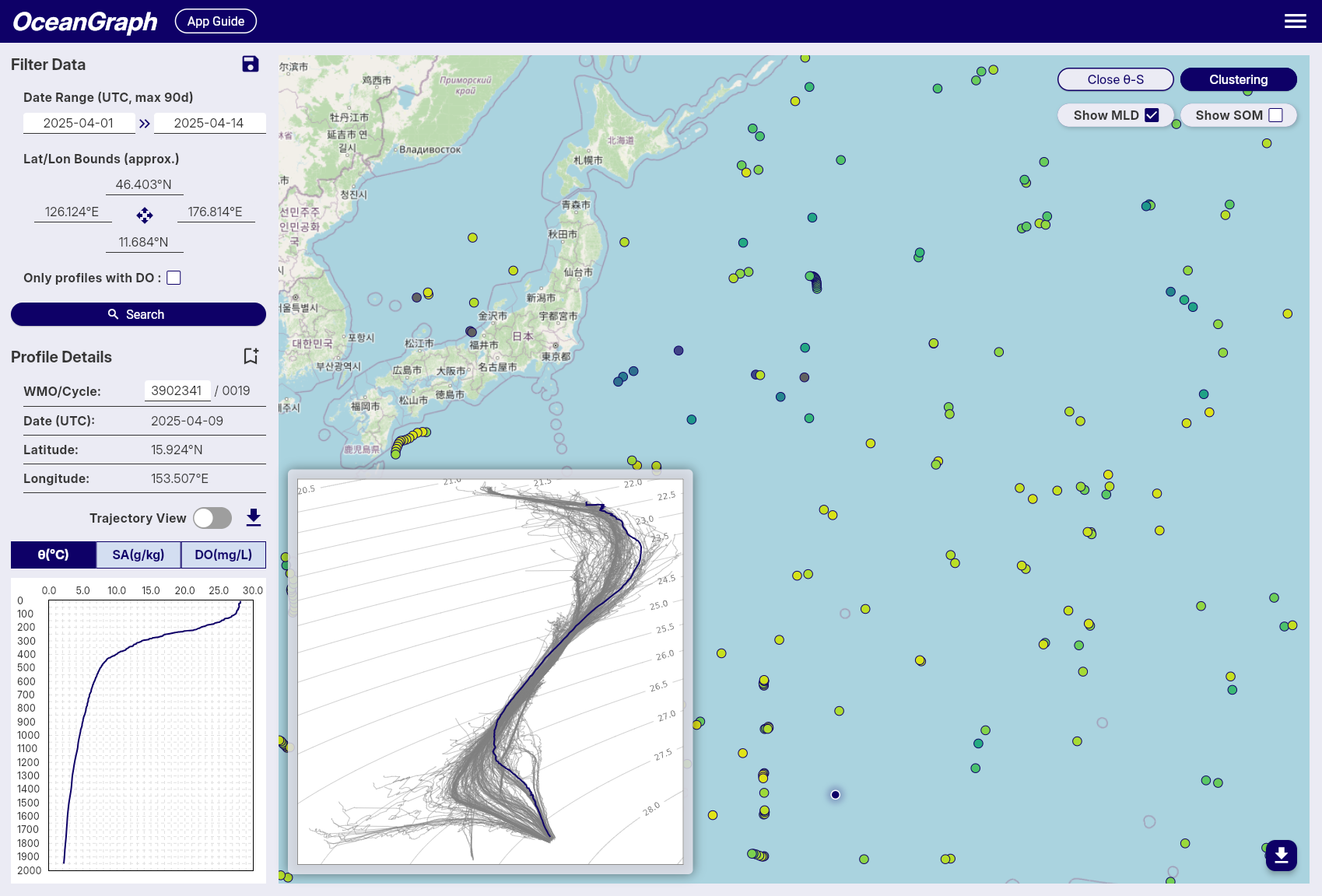
Try a Real Example in OceanGraph
If you want to move from theory to interpretation, the fastest path is to open real Argo data and inspect both the profile view and the T-S view together.
Try with real Argo data -> OceanGraph
Explore profiles interactively
This is especially useful if you are learning oceanography, preparing for research, or trying to understand ocean temperature-salinity relationships before building a heavier analysis workflow.
Frequently Asked Questions
What does a T-S diagram show in oceanography?
It shows the relationship between temperature and salinity in seawater. Oceanographers use it to identify water masses, mixing, and density-related structure.
Is a T-S diagram the same as a θ-S diagram?
They are closely related. A classic T-S diagram uses temperature and salinity, while a θ-S diagram uses potential temperature and absolute salinity. In practice, both are used to interpret water-mass structure.
Can I read a T-S diagram without knowing the exact water mass names?
Yes. The first step is to recognize patterns such as clusters, curves, and mixing-like transitions. Naming specific water masses can come later.
Why use a T-S diagram if I already have a vertical profile?
Because a vertical profile shows how one variable changes with depth, while a T-S diagram shows how temperature and salinity combine to define different water types.
Do I need Python to make a T-S diagram?
No. Python is useful for custom analysis, but it is not required to start learning. OceanGraph lets you inspect θ-S structure directly using real Argo data.
Conclusion
A T-S diagram is one of the clearest tools for understanding how temperature and salinity work together in the ocean. Once you stop expecting it to behave like a depth profile, the plot becomes much easier to read. You start to see water masses, mixing, density structure, and variability more directly.
For most beginners, the best workflow is not to start with code. It is to look at real examples, compare them with vertical profiles, and build intuition first. That is where OceanGraph becomes useful.